Showing posts with label SEO. Show all posts

Saturday, 23 November 2013

Submit Your Blog to Technorati & Indiblogger

Posted by Unknown
Submit your blog to higher ranking directories to get strong backlinks from them, which help you to get higher pagerank. The two famous blog directories are technorati and indiblogger. Submit your blog to them, they will verify your blog via token or other method. It generally take 1 week to get fully varified.
If you face any trouble to submit your blog, please feel free to contact here.
Read More

Friday, 18 October 2013

How To Make My Blog Load Faster?

Posted by Unknown
Just think about the homepage of number one website in the web, google.com. The words strike on your head seeing it- Simple, Clean. Search Engine loves sites/blogs qwith lowerloading time.


How to reduce your blog loading time?
1> Remove unnecessary widgets-
People who have just starting their blog often use multiple widgets to make their blog eye catchy, but the fact is it increases the loading time. So first remove those widgets as much as you can. For e.g- Feedjit. Newbie bloggers loves to trace their visitor with many widgets, feedjit is one of them. But it increases the blog loading time. But you don't want to remove it? Just hide this from your blog/site and trace the visitors with a feedjit link.
Go to blogger --> Layout --> Edit Feedjit HTML

It starts with some javascript codes like- [<script type="text/javascript" src="http://feedjit.com/serve...]
Got it? ok.. now you have to do a little change. Edit it like-

<div style="height:0;width:0;overflow:hidden;">

Your Feedjit Code

</div>

Save it. Now go to your blog and check, make sure that the feedjit box is hidden. But how will you check your feedjit feed?

Type "http://live.feedjit.com/live/example.com/0/"  in your address bar.

 Replace example.com with your URL. Your feeds will appear like this.
2> Resize images:- sometimes images take a vital role on blog post, but large images can increasees your blog's loading speed. So resize them and upload. You can use "Photoscape" to resize the images or if you have Photoshop, this can be done by simply clicking 'save for web'.

3> Reduce the number of scripts:- The less scripts you use, your blog get faster.

4> Reduce the number of posts:- Reduce the number of posts publish on the main page. Go to Settings --> Posts and Comments. You will  see like this.
The default number of posts is 10. Change it to 4-5 posts. It will take lesser time to load your blog.
   
Follow this guides, hope you will get better experiences.
Read More

Why my Traffic Drops upto 60%

Posted by Unknown 2 Comments
Google's latest web-spam removing algorithm Penguin 2.1 launched on 4th October,2013. This causes a massive traffic drops for many website/blogs. Matt Cutts, head of the webspam team at Google, tweeted-
You can see the poll results. Courtesy- www.seroundtable.com

 How to recover from Penguin 2.1- Its now a vital issue for maximum webmasters/bloggers to recover their site/blog from Penguin 2.1. As you know its a web-spam removing update. So, 1st remove all your spam links, delete irrelevant content link, weak backlinks as much as you can. You can delete all spam backlinks by Disavow them from google webmaster tools. Click here- https://www.google.com/webmasters/tools/disavow-links-main
Caution- Be alert, don't misuse it, otherwise your indexing can get lost.

2> Delete your poor, duplicate(if exists) contents.
 Because, search engines don'tlove duplicate contents,they love fresh and unique contents.

3> Delete links from link-farm,like those sites which are created only for Search Engine Optimization.

Check if you do all the needful, and wait for a week. Hopefully your traffics will be get normal.


But how do you track your traffics??? Simple!
Google analytics!!! As it showed the traffic drops, it will show you the recovery in the same way.
Read More

Submit a Blog to Webmaster Tools

Posted by Unknown
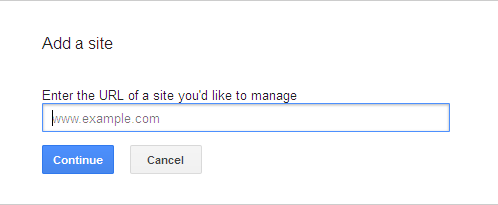
When you owned a blog, you have to control it. Webmaster tools help you to control/manage your blog. The steps are shown below, how to submit a blog in webmaster tools.

1>  Sign in your google profile

2> Go to https://www.google.com/webmasters/tools

3>  You can see "add a site" option at the top right like this. click on it.

 4> A dialouge box will appear.

5> Put your website/ blog's URL  in the box and select "continue".

6> The verification system will appear with details.

Note:- Blogger doesn't not have any option to upload file. So you have to choose alternate option. I'll recommand to add a meta tag to your blog's homepage.

7>  Goto blogger --> templete --> Edit HTML 

8> Click anywhere in the HTML box.

9> Find (CTRL + F) <head>  and paste the meta tag just below it.

10> Click on verify in the webmaster tools. The message will appear.

Read More

Sunday, 10 March 2013

Want to earn money from blog? First learn SEO!

Posted by Unknown
Nowadays many bloggers want to earn a decent money from google adsense or other alternative programs even after they leave blogging. Even a cow stop producing milk if you stop feeding. So you have to blogging continuously and update your blog regularly if you want to make money. Because if you don't maintain and update your blog with rich and unique contents, visitor will not arrive to your blog. Visitors want good and unique contents, they have no interest in your business, they don't know you. they will know you through your blog or more specifically your blog contents. If you serve they a quality contents they want, in return they will visit again in your site. And your earning from they blog will increase. No visitors means no income.
So you have to know how to drive traffics toward your blog. That's why you have to learn SEO. SEO means Search Engine Optimization. It means the visibility of your website or blog or a certain webpage to search engines. Suppose a user searching for "why adsense is disabled" in google search engine. Millions of results will appear, but he/she will click the first page's result. 85 percent will do this, rest of them visit page  2 or page 3, maximum page 4. So if your page appearing in page 5 or 6, what it will be??? No visitor will come. That means no click and no income. The tactics for appearing your website/blog or a certain webpage in a from page are called Search Engine Optimization. Google uses an algorithm that decides which page will appear st and which appear later. It is called "PageRank".


Google PageRank is measured in a scale of 0-10.New website/blog are rated "N/A". The better PageRank means to get the better place in search results.It is based on backlinks. The more quality backlinks you have, get better google PageRank.So, if you want blogging for making money, first learn SEO, know how to place your blog in a better position, it gains clicks, means better income.
Read More
Related Posts Plugin for WordPress, Blogger...