Showing posts with label Blog Posts. Show all posts

Sunday, 27 October 2013

How to Move Blogger Menu above Header

Posted by Unknown
Today I will show you how to move blogger menubar to the top of header. First back up your templetes.
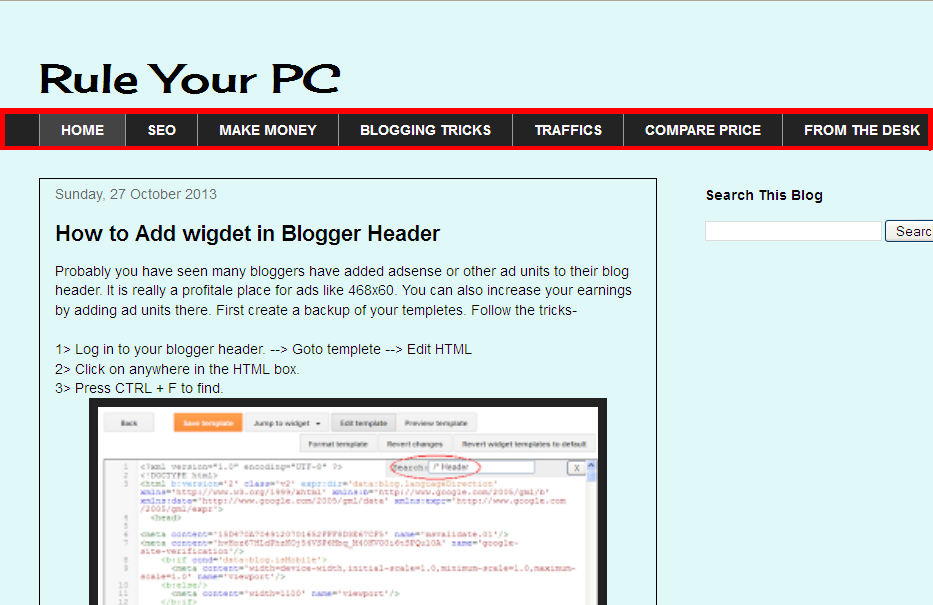
 before shifting the manubar
 after shifting the menubar to above the header.
[I've changed the design a little ]
They follow as describes-
1> Login to Blogger --> Goto Templete --> Edit HTML
2> press CTRL+F to bring the search box.

3> Search for these words.

 4> Cut them all upto & including the line just above <div clas=’main-outer’>
 [The codes can be slight different from yours, just copy from <div class=’tabs-outer’> to <div class=’main-outer’>]
5> Search for the code- <header>
6> Paste all the codes just below <header>.
7> Save it... Finish! :)
Read More

How to Add wigdet in Blogger Header

Posted by Unknown
Probably you have seen many bloggers have added adsense or other ad units to their blog header. It is really a profitale place for ads like 468x60. You can also increase your earnings by adding ad units there. First create a backup of your templetes. Follow the tricks-

1> Log in to your blogger header. --> Goto templete --> Edit HTML
2> Click on anywhere in the HTML box.
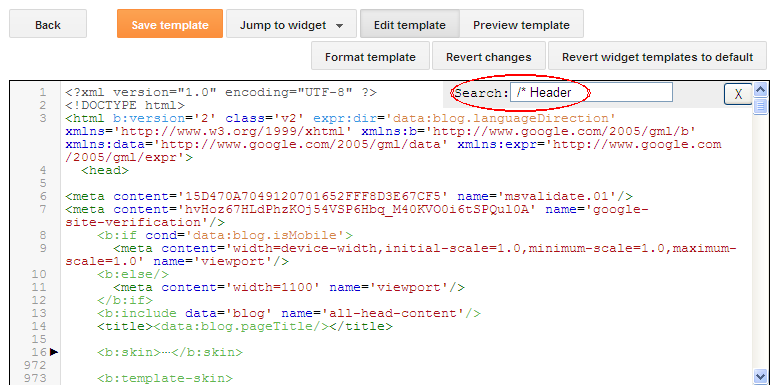
3> Press CTRL + F to find.

4> Search for the following code-
5> Repace the above code ith it.

6> It should be like this-

7> Now search for the following code- ]]></b:skin>
8> Add the following code just above it.

9> Now search for the code- ]]> </b:template-skin>
10> Paste the following code just above it.

11> Save the template and goto layout. You will see two column header. :)
Read More

Sunday, 20 October 2013

Common Mistakes That New Bloggers Do- Part 1

Posted by Unknown 2 Comments
It has been almost 4 years, I have been blogging. I have learned so much from the very first day, even now I called myself a learner than a blogger. Let me say about my story. When I started blogging, I thought how to make money from it, instead of how to blog properly. I don't know even what is real blogging. Nowadays I see many new bloggers who copied from another resource and put in down to their blog and then applied for Google Adsense. A bad news for them, duplicate materials can instant lead to google penalty for your blog.
 
It means google will remove your blog from their indexing. As you know google is the mejor source of visitors. So, if google stop indexing, your traffics will decreased a lot. No traffic = No money. I also did this same so now I know what the basic idea is and which are the remarkable mistakes. I made those wrong so now I know which are right. I hope it will helps new bloggers to make their way easier. Hope they will avoid the mistakes which I did.

Niche of your blog:- The first thing that I will tell is be careful about your niche. Suppose you are a gadget freak, you want to make a blog about gadget. Remember the gadget term sounds small but it really a wide and vast niche. From Apple iPhone to Samsung Galaxy, from I7 processor to 2TB expandable hard dicsk. So focus more on selecting your niche.It can be on android or something like that. To understand the demand of your niche just go to Google Keyword Planner, click here- Google Keyword Planner . For any problem you can go for  How to use keyword planner.

Content:- Previously said that many newbie bloggers like to copy contents from other blogs related to their niche and post this into their blog, which I also did. But the problem is nowadays google are very much aware about low quality, duplicate contents, they released algorithns like Penguin, Hummingbird, Panda frequently to remove poor quality, duplicate contents, from their index. So, produce your own unique contents, and publish. Google loves fresh unique contents. To protect your own articles from being copied just follow these tricks- How to Stop Copying Text from My Blog.             [To be continued]
Read More

Saturday, 19 October 2013

How to Stop Copying Text from My Blog?

Posted by Unknown
Nowadays copying or stealing content from one's blog/website is very normal and increasing rapidly. Many newbie bloggers do the same thing instead of learning how to blogging properly. A bad news for those, google nowadays updates their algorithm rapidly to remove duplicate, poor spam content from their indexing.
Still if people continue copying your original articles and publish in their blog/website, it's just unbearable, because you created those articles for your blog visitors spending several minutes or even some hours. To prevent those copycats from copying your blog posts folloe the simple tricks.
Go to Blogger --> Layout --> add a HTML/JavaScript gadget --> paste the code below and save it. 


Now throw away all the headache of being stolen your original contents. Keep posting. :)
Read More
Related Posts Plugin for WordPress, Blogger...