Showing posts with label Blogging Tricks. Show all posts

Thursday, 24 July 2014

How to get unlimited visitors to your blog from hitleap

Posted by Unknown 3 Comments


What is HitLeap?
What is HitLeap?
HitLeap is a free Traffic Exchange, delivering hits to any website, on-demand.
We help you increase your website visitors, rankings and more.
Our affiliate program lets you earn cash and traffic commissions of up to 50%.

How does it work?
After signing up, you will submit all the websites you want to send traffic to.
Then you will earn free traffic by viewing other people\'s websites.
Alternatively, you could buy a traffic package from us.


What are minutes?

Let us say you have 1,000 minutes in your account. Minutes are normally earned by watching other members websites through the automatic Traffic Exchange system. Read more about it here.

The minutes are used to deliver visitors to your websites. When submitting your website into HitLeap, you can choose how long you want the visitors to stay on the website: between 10 and 60 seconds.

Let us also assume that you have submitted one website under My Websites, and the visit duration has been set to 30 seconds, which is 0.5 minutes. This is the amount of minutes that every hit will cost you.

Therefore, 1,000 minutes on your account will give you: 1,000 minutes / 0.5 minutes = 2,000 hits in total. If the visit duration is set to 60 seconds, you would receive: 1,000 minutes / 1 minute = 1,000 hits in total.


How to Earn as a Free Member
You can earn money by referring new people to HitLeap.

Whenever one of your referrals buys something from HitLeap, you are immediately credited with up to 50% of the purchase value. The percentage you earn depends on your account type.

For example, if you are a Premium member and your referral buys 50,000 Minutes for € 35.00, you will immediately earn € 17.50.

The cash is added to your accounts cash balance and can be withdrawn to your Paypal account after you reach the minimum € 5.00 balance.

You can view your current cash balance by clicking on Referrals after logging in.


Recommended Upgrades
Account Feature Regular Premium Lite Premium
Maximum traffic exchange ratio 70 % 80 % 100 %
Website slots 3 5 15
Monthly minutes bonus 0 2,000 5,000


Earnings from referrals

Regular Premium Lite Premium
Minute commissions 20% 25% 30%
Cash commissions 20%* 30%* 50%*


Premium
€ 7 / Month

Premium Lite
€ 3 / Month


HitLeap Strategy
How do I refer people?

Every member has a unique referral link. For example, if your username is default, your referral link will be: https://hitleap.com/by/default
You can view your unique referral link on the Referrals page.

When you give this link to somebody and they open it, they are redirected to HitLeap. After registration, that person will become your referral.

You will also receive an e-mail notification about this. You can view all your referrals on the Referrals page.

You earn cash commissions on every purchase your referrals make.

If you cannot sponsor, feel free to promote the guide with your ID in it (see the referrals co-op for details)
Good luck and thanks for reading!

Anyone who sponsors this co-op will be able to fill their downlines for a longer period of time, and more economically efficient. For example: You could run a one day fixed ad somewhere and get a coupple of referrals. Or, you could spend the same amount and have your affiliate banner displayed to relevant users FOR LIFE! And, you will be guaranteed to traffic to this guide FOR LIFE. Now think about it... that is a one time purchase that will help you permanently. Once the co-op sells out of sponsorships, the program will be added to the webmaster's "official guides" and become a monthly subscription program PERMANENTLY INCLUDED in the webmaster's Ad co-op, that pays recurring commission prizes to the lifetime sponsors... FOR LIFE! The more sponsorships you have in this co-op, the more chances you will have at winning those prizes down the road, the more traffic your referral ID will get, and also member profile views, where you can showcase ALL of YOUR referral links!


Author's Updates
The author has not posted any updates yet


Disclaimer/Reader Responsibility
These guides are written by members, and in no way does ptcreferrals.net guarantee your results using this program, or any program for that matter. These guides are intended to allow members to share their experiences, and yours may vary greatly. Thank you for reading, and if information in this guide seems intentionally misleading or inaccurate, please contact the webmaster.
Read More

[Killer method] Make $20 a day just by Autopilot

Posted by Unknown 11 Comments

First of all you would be needing Premium account here: HitLeap - The Quality Traffic Exchange OR any other website which provide this service for free like: Free Anonymous Traffic Exchange and Free Facebook And YouTube Likes Exchange

Method # 1

Sign up here: LikesPlanet.com | Free Facebook Likes | YouTube Dislikes/Plays/Likes | Get Photo Likes | Traffic Alexa Boostup | Social Media Exchanger | Get Paid Money from Facebook/Twitter | 1st Source Related for Social Media Traffic Advertising.
Here: LikesASAP - Register
Here: Signup | Paid-To-Promote.Net

Grab Your PTP links from these website and put them into the traffic exchange of these websites: Free Anonymous Traffic Exchange and Free Facebook And YouTube Likes Exchange OR HitLeap - The Quality Traffic Exchange

Earning From This Would be Some where around $1.5 to $10 per 24 Hours depending upon how many VPS/accounts you have!

Method # 2

Go to Blogger.com create an blog, name doesn't matter. Put some contents on the blog. You can grab the contents around the internet, just spin them.

Then sign up here: HTTPS://EXAD.ME/?REF=DEANWINCHESTER
Here: YllixMedia (Yllix Inc.)
And Here: LoveCPM.com - Pay per every impression

Grab your ad codes from these websites and put them into your blog all round your blog, in header, in footer, in side bar, with in contents, even put pop up ad codes and pop under!


Then put your blog link into the traffic exchange of these websites: Free Anonymous Traffic Exchange and Free Facebook And YouTube Likes Exchange OR HitLeap - The Quality Traffic Exchange

Estimated Earning $1 to $40 Per 24 Hours, depending upon how many VPS you have and how many blogs you create and mostly importantly you use ultimate spam trick or not (Mostly all of you know it).


Method # 3

Earn Bitcoins and use them for Gambling or sell and mine more bitcoins!

You can get free bitcoins from here: Free Bitcoins, free Lightcoins, free Feathercoins - QoinPro
Here: FreeBitco.in - Win free bitcoins every hour!

Get bitcoin from here and use them for gambling.

Estimated earning: Well many people earn more then $500 per day from gambling and many lose $5000 in one day in gambling!

Method # 4

Its about reselling video games!

First You are required to sign-up here: https://www.g2a.com

and here: Free Anonymous Traffic Exchange and Free Facebook And YouTube Likes Exchange (Or any other exchange site)

Selling Games Through Twitter

Go To https://www.g2a.com/goldmine/reflinks/ and copy your games links (Referral Links)
Start Posting them on twitter and say something like" WOW BattleField 4 On great discount, don't miss it" "50% Discount On Fifa, don't Miss it man" "Get Discount on all games up-to 80% only on (Your Referral Link)"
With-in Few Seconds You Will start getting hundreds of clicks and at least one of them will buy the game.

Note You will need followers if you don't have them get them from exchanges like here: Free Anonymous Traffic Exchange and Free Facebook And YouTube Likes Exchange

Selling Games Through Facebook

Start posting same as you post on Twitter, send private messages to you friends and join games related groups and pages. There you can start real spamming

If you are good at video creation then YouTube will be goldmine for you!

Estimated earning $5 per game sale, i.e. if you get 10 sales per day total profit would be around $50
Read More

Wednesday, 19 February 2014

[Must Read] Paypal Money Adder Bot Legit or Scam?

Posted by Unknown 13 Comments
If you search about making money online, you can see thousands of reults and you can understand what can a people do for money, like clicking ads (ptc), freelancing jobs etc... they searches randomly to make 1$ aday, and you think about to sit on sofa, eating popcorn and watching your favourite show while your bank balance will increase day by day??? huuhh... I've tried several paypal money adder bots, no one does not run.
If you want this bot i can give you, try it yourself and feel free to comment here... Download
But one of them is really harmful, it will ask you to input your password (paypal password), don't do this, if you want to keep your account safe. If you seriously want to make real money go to "MAKE MONEY" section, there are many ways to make paypal money.
Read More

[Must Read] Paypal Money Adder Bot Legit or Scam?

Posted by Unknown 133 Comments
If you search about making money online, you can see thousands of reults and you can understand what can a people do for money, like clicking ads (ptc), freelancing jobs etc... they searches randomly to make 1$ aday, and you think about to sit on sofa, eating popcorn and watching your favourite show while your bank balance will increase day by day??? huuhh... I've tried several paypal money adder bots, no one does not run.
If you want this bot i can give you, try it yourself and feel free to comment here... Download
But one of them is really harmful, it will ask you to input your password (paypal password), don't do this, if you want to keep your account safe. If you seriously want to make real money go to "MAKE MONEY" section, there are many ways to make paypal money.
Read More

Google Adsense Alternative|Adversal payment proof

Posted by Unknown 3 Comments
Adversal is a good google adsense alternative, and they pay a decent ecpm rates. Minimum payout is 20$ which is really good for a small blogger with 100% fill rate. Check my 2 adversal payment proofs. If you want to make money with adversal. join under me from here. SIGN UP. Contact at webmastersourajit@gmail.com for some money making tricks.


Read More

Saturday, 23 November 2013

Submit Your Blog to Technorati & Indiblogger

Posted by Unknown
Submit your blog to higher ranking directories to get strong backlinks from them, which help you to get higher pagerank. The two famous blog directories are technorati and indiblogger. Submit your blog to them, they will verify your blog via token or other method. It generally take 1 week to get fully varified.
If you face any trouble to submit your blog, please feel free to contact here.
Read More

Friday, 1 November 2013

Does Procpm work with traffic exchange?

Posted by Unknown 5 Comments
Few days ago I suddenly found a cpm ad network named procpm and people claimed that it works finely with traffic exchange site and traffic bot like jingling. here is a google search relt screenshot.
You can find some payment proof from thebotnet.com result(s). But the fact is does procpm really work with traffic exchange. They refer hitleap.com, jingling asa a bot. But I have tested them. They result is unexpectedly worst! The cpm rate is very low, near about 0.01$. Check the screenshot.
 I will strongly recommend you not to go with procpm.com. Go for another ad network, you can check about any ad network at ptc-investigation.com
Read More

Sunday, 27 October 2013

How to Move Blogger Menu above Header

Posted by Unknown
Today I will show you how to move blogger menubar to the top of header. First back up your templetes.
 before shifting the manubar
 after shifting the menubar to above the header.
[I've changed the design a little ]
They follow as describes-
1> Login to Blogger --> Goto Templete --> Edit HTML
2> press CTRL+F to bring the search box.

3> Search for these words.

 4> Cut them all upto & including the line just above <div clas=’main-outer’>
 [The codes can be slight different from yours, just copy from <div class=’tabs-outer’> to <div class=’main-outer’>]
5> Search for the code- <header>
6> Paste all the codes just below <header>.
7> Save it... Finish! :)
Read More

How to Add wigdet in Blogger Header

Posted by Unknown
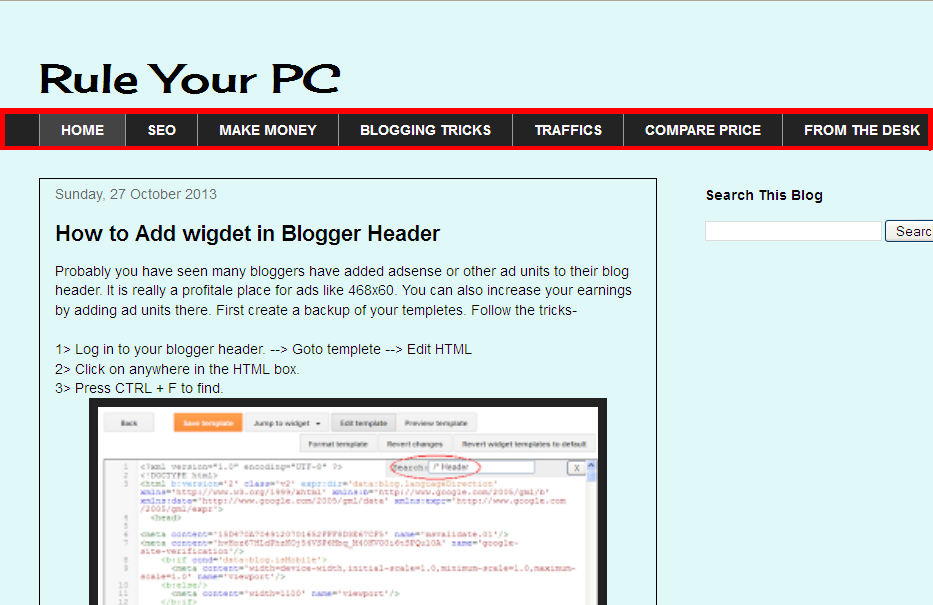
Probably you have seen many bloggers have added adsense or other ad units to their blog header. It is really a profitale place for ads like 468x60. You can also increase your earnings by adding ad units there. First create a backup of your templetes. Follow the tricks-

1> Log in to your blogger header. --> Goto templete --> Edit HTML
2> Click on anywhere in the HTML box.
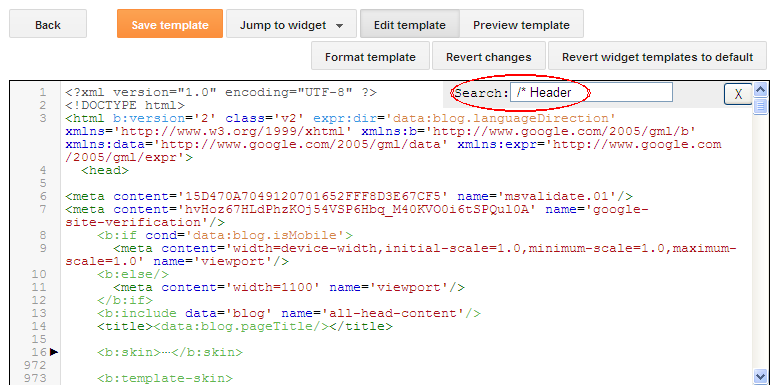
3> Press CTRL + F to find.

4> Search for the following code-
5> Repace the above code ith it.

6> It should be like this-

7> Now search for the following code- ]]></b:skin>
8> Add the following code just above it.

9> Now search for the code- ]]> </b:template-skin>
10> Paste the following code just above it.

11> Save the template and goto layout. You will see two column header. :)
Read More

How to Remove Navbar from Blogger Blogspot

Posted by Unknown
Every blogger has got a Navigation Bar that appears by default at the top of every blogspot blog or better call Blogger powered blog. But it is sometime very disgusting. So here is the way to remove the navbar.

1> Log in to your blogger account --> Goto Layout
2> You will see the navbar option at the top right corner like this.
3> Click on 'edit'.
4> A box will apear with different color of navbar. Choose the last one named "off". Save it.

5> Click on save arrangement. Your navbar is successfully remove from your blog. :)
Read More

Saturday, 26 October 2013

How to Remove Comment Box from Page

Posted by Unknown
We often add sitemap, contact us, provacy policy, or somethime sitelinks as a page. But there is a comment box below which is not necessary. Where we are using our personal comment box, what will we do with default comment box? So remove them. But how? follow the points.

1> Log in to Blogger --> Dashboard --> Click on "Pages" option.
 
 2> Click on edit in which page do you want to remove the comment box.
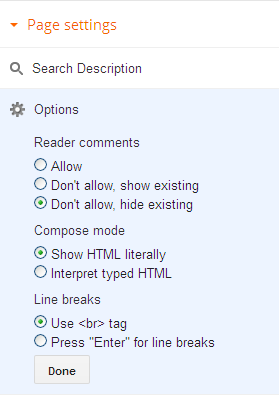
3> You will see page settings option on the right side of the page. Click "option", select "Don't allow,hide existing" under the 'Reader comments'.
3> Click on "Done" and update the page. Finish :)
Read More

Friday, 25 October 2013

11 Adsense Facts That You Must Know

Posted by Unknown 3 Comments
Google Adsense is the most popular and leading CPC network, so here is some facts about Adsense.


1> Is Google Adsense CPC or CPM Network?
 The myth is like all text-based ads are paid on CPC basis, where all image-based ads are paid on a CPM basis.But the real fact is both image and text ads are paid on either a CPC or CPM basis.

2> What is Google Adsense's Basic Requirements?
User must have own blog/website, must be 18+ age, atleast 50 posts and 6monthes old.

3> Is Google Adsense free or need to pay any registration fee?
No, the program is completely free.

4> Does google adsense pay through paypal?
No, Adsense never send money through Paypal. You can only get your revenues through electronic funds transfer or check.

5> How much adsense pay per click?
No one can say. The click depends on how expensive the keywords shown on your site, bidding of the advertisers. They generally pay as low as $0.01 to as much as $25 per click.


6> Is it necessary to add a Privacy policy?
Privacy Policy actually describes to your readers about what they will get on your Blog. A can be disapproved first and later approved after adding Privacy Policy only.

7> Has google banned adsense accounts in India?
No, they just strict their privacy policy for some countries like India, China, Indonesia etc.

8> What is Google Adsense's minimum payout Ammount?
Adsense's minimum payout Ammount $100.

9> How to get fast approval from google adsense?
Create unique original contents, make a simple easy to navigate design, add privacy policy, contact us page. Then apply for adsense.

10> what is the difference between adsense and adwords?
AdSense is for website/blog publishers to place ads on their websites/blogs where they get paid per visitor click through on a Google ad. Where AdWords is for advertisers who pay Google to have their ads on sites and google search results and pay per click on their advertisement.

11>  Banned or disapproved from google adsense. Some Alternatives please.
You can try Chitika, Media.net .They are really good adsense alternatives.
Read More

Sunday, 20 October 2013

Common Mistakes That New Bloggers Do- Part 1

Posted by Unknown 2 Comments
It has been almost 4 years, I have been blogging. I have learned so much from the very first day, even now I called myself a learner than a blogger. Let me say about my story. When I started blogging, I thought how to make money from it, instead of how to blog properly. I don't know even what is real blogging. Nowadays I see many new bloggers who copied from another resource and put in down to their blog and then applied for Google Adsense. A bad news for them, duplicate materials can instant lead to google penalty for your blog.
 
It means google will remove your blog from their indexing. As you know google is the mejor source of visitors. So, if google stop indexing, your traffics will decreased a lot. No traffic = No money. I also did this same so now I know what the basic idea is and which are the remarkable mistakes. I made those wrong so now I know which are right. I hope it will helps new bloggers to make their way easier. Hope they will avoid the mistakes which I did.

Niche of your blog:- The first thing that I will tell is be careful about your niche. Suppose you are a gadget freak, you want to make a blog about gadget. Remember the gadget term sounds small but it really a wide and vast niche. From Apple iPhone to Samsung Galaxy, from I7 processor to 2TB expandable hard dicsk. So focus more on selecting your niche.It can be on android or something like that. To understand the demand of your niche just go to Google Keyword Planner, click here- Google Keyword Planner . For any problem you can go for  How to use keyword planner.

Content:- Previously said that many newbie bloggers like to copy contents from other blogs related to their niche and post this into their blog, which I also did. But the problem is nowadays google are very much aware about low quality, duplicate contents, they released algorithns like Penguin, Hummingbird, Panda frequently to remove poor quality, duplicate contents, from their index. So, produce your own unique contents, and publish. Google loves fresh unique contents. To protect your own articles from being copied just follow these tricks- How to Stop Copying Text from My Blog.             [To be continued]
Read More

Saturday, 19 October 2013

How to Stop Copying Text from My Blog?

Posted by Unknown
Nowadays copying or stealing content from one's blog/website is very normal and increasing rapidly. Many newbie bloggers do the same thing instead of learning how to blogging properly. A bad news for those, google nowadays updates their algorithm rapidly to remove duplicate, poor spam content from their indexing.
Still if people continue copying your original articles and publish in their blog/website, it's just unbearable, because you created those articles for your blog visitors spending several minutes or even some hours. To prevent those copycats from copying your blog posts folloe the simple tricks.
Go to Blogger --> Layout --> add a HTML/JavaScript gadget --> paste the code below and save it. 


Now throw away all the headache of being stolen your original contents. Keep posting. :)
Read More

Friday, 18 October 2013

How To Make My Blog Load Faster?

Posted by Unknown
Just think about the homepage of number one website in the web, google.com. The words strike on your head seeing it- Simple, Clean. Search Engine loves sites/blogs qwith lowerloading time.


How to reduce your blog loading time?
1> Remove unnecessary widgets-
People who have just starting their blog often use multiple widgets to make their blog eye catchy, but the fact is it increases the loading time. So first remove those widgets as much as you can. For e.g- Feedjit. Newbie bloggers loves to trace their visitor with many widgets, feedjit is one of them. But it increases the blog loading time. But you don't want to remove it? Just hide this from your blog/site and trace the visitors with a feedjit link.
Go to blogger --> Layout --> Edit Feedjit HTML

It starts with some javascript codes like- [<script type="text/javascript" src="http://feedjit.com/serve...]
Got it? ok.. now you have to do a little change. Edit it like-

<div style="height:0;width:0;overflow:hidden;">

Your Feedjit Code

</div>

Save it. Now go to your blog and check, make sure that the feedjit box is hidden. But how will you check your feedjit feed?

Type "http://live.feedjit.com/live/example.com/0/"  in your address bar.

 Replace example.com with your URL. Your feeds will appear like this.
2> Resize images:- sometimes images take a vital role on blog post, but large images can increasees your blog's loading speed. So resize them and upload. You can use "Photoscape" to resize the images or if you have Photoshop, this can be done by simply clicking 'save for web'.

3> Reduce the number of scripts:- The less scripts you use, your blog get faster.
4> Reduce the number of posts:- Reduce the number of posts publish on the main page. Go to Settings --> Posts and Comments. You will  see like this.
The default number of posts is 10. Change it to 4-5 posts. It will take lesser time to load your blog.
   
Follow this guides, hope you will get better experiences.
Read More

Does Alexa Traffic Rank Really Matter?

Posted by Unknown
What is Alexa Ranking?
Alexa Traffic Rank is a rough measurement of a site/blog's popularity, compared with the all others internet sites. It shows the current rank of the site/blog based upon the daily pageviews. 
           The alexa ranking is shown like that-
a website stats by alexa  


But the question is how much it is appropriate? Is it show the actual measurement?
The answer is a big "NO"! Alexa only provide a rough measurement based on the survey from the user's activity on sites. It means if you installed their extension toolbar, alexa will track how much will you spend on internet in which site. Don't fear, they keep user's privacy as well. Alexa collects traffic data on regular basis from millions of users who have installed the Alexa toolbar. That means they only count those visitors who have installed the toolbar in their compluter, or more specifically in their browser. So, a website with good alexa rank does not mean it has good traffic.It only means that it has good mumber of visitors who have installed alexa toolbar. Do you know which type of website visitors use this toolbar most? It's simple! The tech-blogg readers use it most, because they know what the toolbar is, how to use it. So if your blog related to technology, blogging, SEO etc, you will definitely get a better alexa ranking.

Yet "Alexa Ranking" is used widely, let's check why?
1> Because it gives slightly real stats of traffic & keywords of yours and your competitors.
2> If you rank well in Alexa, your chance will be higher to get more exposure and advertisers. So if you want to get quality amount of advertisers(except Adsense and Textual Advertisers) you must have to rank well in Alexa.

Conclution- You can't either totally avoid or take it seriously. If you want to make a really eye-catchy site, you should keep pace with alexa ranking for gettting better advertisers. If you give priority to the traditional advertiser most, then just ignore it.
on regular basis.
on regular basis.
According to WikiPedia, Alexa Traffic Rank is a subsidiary company owned by Amazon.com - See more at: http://www.papablogger.org/2013/04/does-alexa-traffic-rank-play-vital-role.html#sthash.Jmdjmg6B.dpuf
ank is one of the most over rated term when it comes to judge quality of a - See more at: http://www.alltechbuzz.net/2013/04/does-alexa-rank-matters.html#sthash.3GUxcH0n.dpuf
Read More

Why my Traffic Drops upto 60%

Posted by Unknown 2 Comments
Google's latest web-spam removing algorithm Penguin 2.1 launched on 4th October,2013. This causes a massive traffic drops for many website/blogs. Matt Cutts, head of the webspam team at Google, tweeted-
You can see the poll results. Courtesy- www.seroundtable.com

 How to recover from Penguin 2.1- Its now a vital issue for maximum webmasters/bloggers to recover their site/blog from Penguin 2.1. As you know its a web-spam removing update. So, 1st remove all your spam links, delete irrelevant content link, weak backlinks as much as you can. You can delete all spam backlinks by Disavow them from google webmaster tools. Click here- https://www.google.com/webmasters/tools/disavow-links-main
Caution- Be alert, don't misuse it, otherwise your indexing can get lost.

2> Delete your poor, duplicate(if exists) contents.
 Because, search engines don'tlove duplicate contents,they love fresh and unique contents.

3> Delete links from link-farm,like those sites which are created only for Search Engine Optimization.

Check if you do all the needful, and wait for a week. Hopefully your traffics will be get normal.


But how do you track your traffics??? Simple!
Google analytics!!! As it showed the traffic drops, it will show you the recovery in the same way.
Read More

How to Hack Traffic Exchange Sites

Posted by Unknown 8 Comments
Traffic Exchange Sites are quite popular nowadays.They help to get a rush of visitors. But it's a slow process. Clicks after clicks are very time-consuming.You can do something better than these silly stuffs.
Letsgo for a speed hack. Sounds interesting? yeah... follow the points below!

1> You must have Mozilla Firefox to hack, google chrome can be little bit faster than Mozilla, but Mozilla helps to hack, it's for advance users.
2> Download Cheat Engine 6.2 or better version.
3> Register in any of the follwing traffic exchange sites- www.10khits.com, www.websyndic.com, www.247autohits.com, and open your account.

Now follow the process...
1. Log in to your traffic exchange site. Click on "Traffic Exchange" & start it.
2. Open CheatEngine. Click the button on the top left corner as shown in the picture.

3. Select the process under "FireFox" and click 'open'. Make sure that the traffic exchange is still running.

4. Check the box "Enable speedhack" and set the speed to 5.0 or 10.0 (recommended). Click Apply.
[Note- Many traffic exchange sites can't keep pace with more than 10X speed.]

Enjoy the speed!!! :)
Read More

Get Huge Traffic From Hitleap

Posted by Unknown 2 Comments
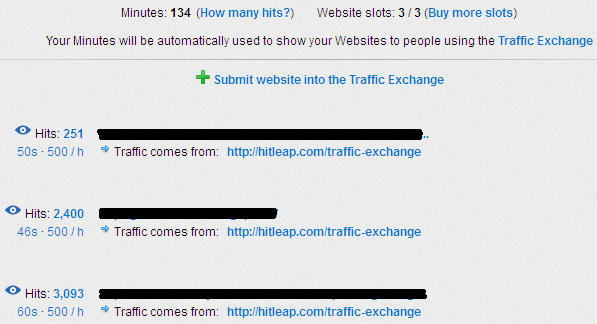
Hitleap.com a traffic exchange site which can drive a massive traffics to your blog/site. It's an autosurf site. You can set custom visit duration from 10 sec to 60 sec. The traffic exchange ratio (regular) is 2:1 or 50% that means if you visit 10 sites you will get 5 traffics to your blog. You can also increase the ratio by downloading hitleap viewer.exe. It's a lightweight application which gives you 70% traffic exchange ratio. You can also upgrade your account to get 100% traffic exchange ratio. To get the massive hits, you have to sign up first, then go to "My Websites" and put your blog URL. It will take 1-2 minutes to be reviewed. Regular user can use maximum 3 websites at a time.
Then start visiting either from the website or the hitleap application. 

It can give you immediate massive traffic hits to your blog. You can understand it by watching this graph.
  
Bingo!!!Keep surfing and drive unlimited traffics from HitLeap - Traffic Exchange Software :)
Read More

Submit a Blog to Webmaster Tools

Posted by Unknown
When you owned a blog, you have to control it. Webmaster tools help you to control/manage your blog. The steps are shown below, how to submit a blog in webmaster tools.

1>  Sign in your google profile

2> Go to https://www.google.com/webmasters/tools

3>  You can see "add a site" option at the top right like this. click on it.

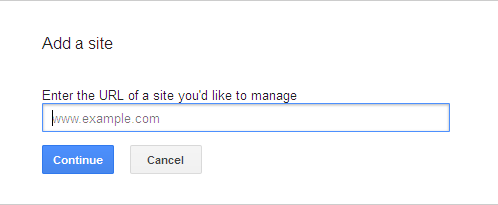
 4> A dialouge box will appear.

5> Put your website/ blog's URL  in the box and select "continue".

6> The verification system will appear with details.

Note:- Blogger doesn't not have any option to upload file. So you have to choose alternate option. I'll recommand to add a meta tag to your blog's homepage.

7>  Goto blogger --> templete --> Edit HTML 

8> Click anywhere in the HTML box.

9> Find (CTRL + F) <head>  and paste the meta tag just below it.

10> Click on verify in the webmaster tools. The message will appear.

Read More
Related Posts Plugin for WordPress, Blogger...